SyncMate is probably the only Mac sync software that allows syncing Mac with multiple devices simultaneously (Android devices, unlimited quantity of iOS devices, other Macs, any MTP devices, and mounted storages). No need to purchase several sync solutions in order to sync
your Mac with each device – just download SyncMate and all supported devices will be synced within one application.
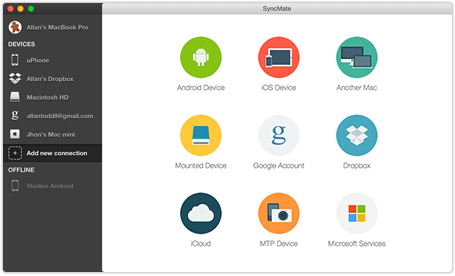
SyncMate can sync data not only with numerous devices, but also with online accounts and cloud storages! Sync data with iCloud storage, Google account (Google Drive is supported), or even with your Dropbox account!

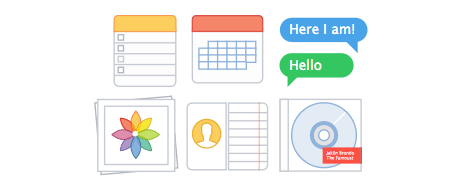
SyncMate lets you sync your Calendars,
Reminders, Contacts, Safari bookmarks,
iTunes, iPhoto. SyncMate lets you read and
manage your SMS messages as well as text
your friends and watch through Call History
directly from your Mac. Moreover, SyncMate
offers you to sync your devices automatically
in the background.
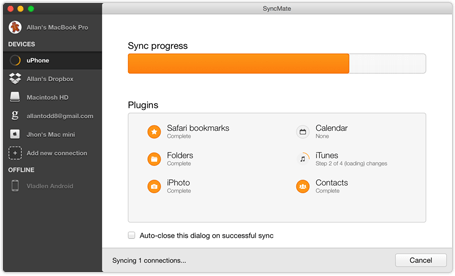
Check out SyncMate video review!
We are introducing you the latest version of SyncMate with the new intuitive interface
and numerous sync options. SyncMate is your all-in-one sync tool for Mac.
Friendly devices for SyncMate
With SyncMate, you can synchronize Mac and various devices and accounts within one app.
Start clicking the devices below to learn more about each connection.
Discover numerous sync options SyncMate offers for your Mac and iOS running devices (iPhone, iPad, iPod Touch, etc)! SyncMate offers you unique possibility to sync iOS running device with MULTIPLE Macs or vice versa - to sync your Mac with multiple iOS running devices!
Doesn't matter how many Macs, iPhones or iPads you own, all of these devices will be perfectly synced if you have SyncMate installed on your Mac!
Contacts
Calendar
Folders
SMS
Call history
Bookmarks
Background Sync
iTunes
iPhoto
AutoSync
Mount disk
Backup
Sync your Mac with Android devices
Synchronize Mac with your Android device ! You can sync plenty of things:
contacts, calendars, folders, images, music, videos and more between Mac
and Android.
SyncMate offers you convenient way of managing Android messages - you can
read, create, send or delete them right on your Mac!
Contacts
Calendar
Folders
SMS
Call history
Bookmarks
Background Sync
iTunes
iPhoto
AutoSync
Mount disk
Music
Backup
Synchronize your Mac with Another Mac
Work with more than one Mac and need all of them to be in sync? Not a problem if
you have SyncMate! Sync Address Book, Calendar and your To Do/Reminders among
all your Macs. iTunes, iPhoto, Folders and Safari bookmarks sync options are also
available.
With SyncMate you can sync as many Macs as you need at the very same moment.
Contacts
Calendar
Folders
Bookmarks
Background Sync
iTunes
iPhoto
AutoSync
Reminders
Music
Backup
Synchronize Mac with Mounted devices
Sync Calendar, Address Book, bookmarks, folders with various files, iPhoto, iTunes
music and videos on your Mac with any mounted storage device (Mac partition,
portable USB storage, any locally connected disk, devices connected via Fire Wire, etc.).
With SyncMate you can create a backup copy of your mounted device data on
your Mac and restore it from there whenever you need in just couple of clicks.
Contacts
Calendar
Folders
Bookmarks
Background Sync
iTunes
iPhoto
AutoSync
Reminders
Music
Backup
Synchronize Mac with Google accounts
SyncMate is a great companion for your Google accounts! Sync your Calendar and
Address Book entries with Google Calendars and Google Contacts for free. This will
keep all important info for you even if you are away from your Mac.
With SyncMate Expert you can also sync images, videos, music, and folders with
numerous files in them between your Mac and Google Drive storage.
Contacts
Calendar
Folders
Background Sync
iTunes
iPhoto
AutoSync
Mount disk
Music
Backup
Synchronize Mac with Dropbox account
SyncMate will easily keep data on your Mac and Dropbox account in sync! Yes,
SyncMate will NOT just ADD data to your Dropbox account, it will SYNC it!
Moreover, SyncMate is probably the only utility which can sync contacts and
calendars between Mac and Dropbox in a few clicks!
Keep data in Mac and Dropbox account in sync with SyncMate and reach it from
anywhere you are!
Contacts
Calendar
Folders
Bookmarks
Background Sync
iTunes
iPhoto
AutoSync
Reminders
Music
Backup
Synchronize Mac with iCloud
With SyncMate you can easily sync your contacts from Address Book on Mac to
iCloud. Keep your contacts up to date on both your Mac and iCloud storage.
Tired of managing several iCloud accounts? Then SyncMate is the right choice for
you. You can easily sync several iCloud accounts into one on your Mac.
Contacts
Calendar
Background Sync
AutoSync
Reminders
Backup
Synchronize Mac with MTP device
SyncMate gives you the power to sync images, videos, music, and folders with
different files in them between your Mac and any MTP device.
No matter which device you have, mobile phone, digital camera, media player or
any portable device, if it supports MTP, it can be synced with SyncMate.
We offer SyncMate in two editions. Free edition helps you solve basic syncing problems.
Expert edition, in its turn, offers an extremely wide range of synchronization options
of your Mac with multiple devices.
We recommend you to test SyncMate Free Edition prior to purchase Expert Edition.
Compare table view
The chart below is a general list of ALL the options offered by SyncMate.
For more detailed info, please check the list of sync options offered specifically for your device.
What I like about SyncMate is that it provides possibility to sync lots of devices with my Mac. And the best in SyncMate is that data can be synced automatically - that's really awesome!
Rick Ross
I'm not very technically inclined but the interface made sense and I picked things up pretty quickly. Brilliant.
Dan Marius
After switching to Syncmate to help me Sync my Android Phone with my MacBook Pro and iPad I never looked back. What really sets SyncMate apart is it's Customer Service. It his been consistently THE BEST. Thanks for being so helpful.