


Sync devices and accounts
Synchronize Mac with multiple devices
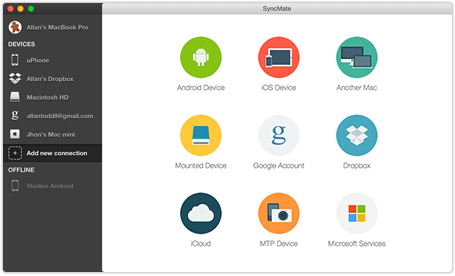
SyncMate is probably the only Mac sync software that allows syncing Mac with multiple devices simultaneously (Android devices, unlimited quantity of iOS devices, other Macs, any MTP devices, and mounted storages). No need to purchase several sync solutions in order to sync your Mac with each device — just download SyncMate and all supported devices will be synced within one application.
Synchronize Mac with online accounts
SyncMate can sync data not only with numerous devices, but also with online accounts and cloud storages! Sync data with Outlook account and Office 365, iCloud storage, Google account (Google Drive is supported), or even with your Dropbox account!

Sync options
Numerous sync options
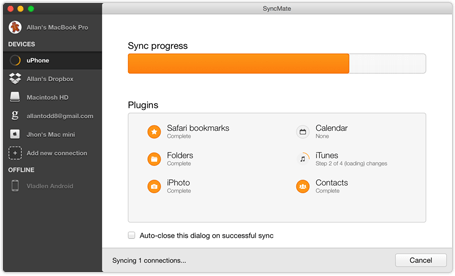
SyncMate lets you sync your Calendars, Reminders, Contacts, Safari bookmarks, iTunes, Photos. SyncMate lets you read and manage your SMS messages as well as text your friends and watch through Call History directly from your Mac. Moreover, SyncMate offers you to sync your devices automatically in the background.
-
Devices

SyncMate 8 supports multiple devices, so you don’t have to buy a separate synchronization tool for each of them — one app will do it for you. The list of the supported devices & sync options available for them can be found here.
-
Sync services

SyncMate 8 is available in Free & Expert editions. Contacts & Calendar entries are synced for free, while Expert offers you extra benefits such as syncing iTunes, Photos, folders, bookmarks and more.
Briefly about syncing Mac with SyncMate
Sync your Mac with multiple devices simultaneously
Keep data on your devices fresh with Autosync
Backup your most vital data in a single click
Background sync, so the app window won't bother





#1 at Utilities
SyncMate Expert
Mac synchronization software
4.5 rank
(Learn more)
Get a download link for Desktop
Submit your email address to get link for quick download and get started!
Submit your email address to get link for quick download and get started!
or
Information
Requirements:
Category: Utilities
Pricing: $39.95
Mac App Store version: Knowledge Base
Languages:
English, Deutsch, Français, 日本の, Русский, Español, Norwegian